Technical deep dive: Splits Connect
A technical walkthrough of the browser extension that connects Splits Teams to other apps.
Why we built Splits Connect
Interoperability is a killer feature of open blockchains. Hundreds of people use Splits to manage their onchain operations, but there are often unique operations and workflows people have: managing token liquidity on Uniswap, registering ENS names, withdrawing fees. Being able to connect to and interact with the broader ecosystem, regardless of how many workflows we build, will always be a core piece of using open blockchains. Splits Connect lets people use their shared accounts anywhere in the ecosystem with the same first-class UX they’ve come to depend on.
Most developers rely on WalletConnect. It works, but it routes every session through third-party infrastructure that we’re unable to shape or debug. Sessions silently expire, a relay server drops a message, a QR code fails to render. Not only are the failure modes common, varied, and hard to reproduce, the entire experience is like asking someone to connect to dial-up in the age of fiber.
Our customers deserve better. They deserve familiar, fast, predictable workflows. No unnecessary dependencies, session ambiguity, or third-party infrastructure between the customer and their accounts. So that’s what we built.
What this post covers
This post is a technical walkthrough of how Splits Connect works and the tradeoffs we made along the way. We’ll go through the full lifecycle of a connection: what the customer sees, how an app discovers Splits, how messages travel from the app to the Splits account and back, and the architectural decisions that shaped the system.
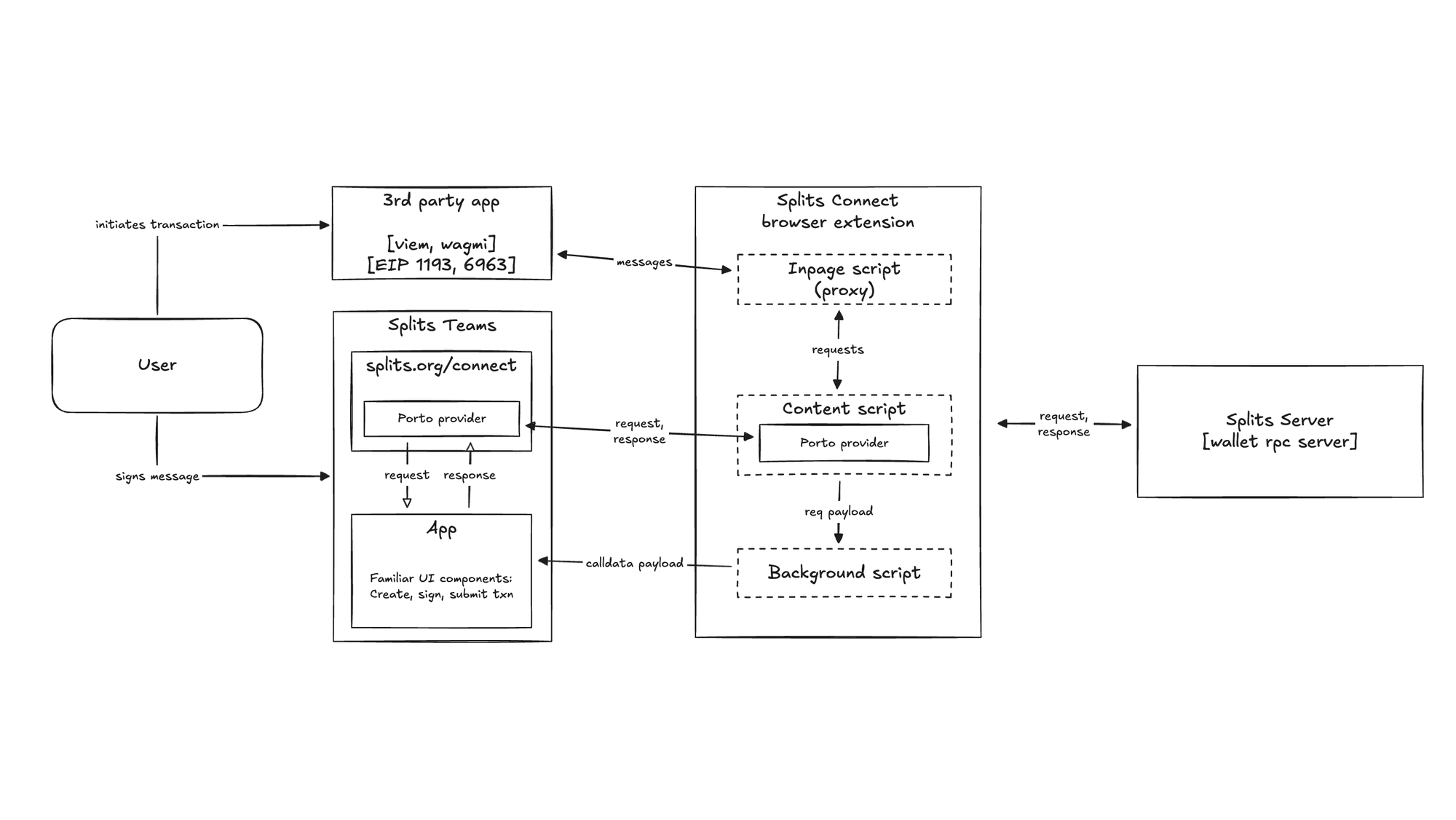
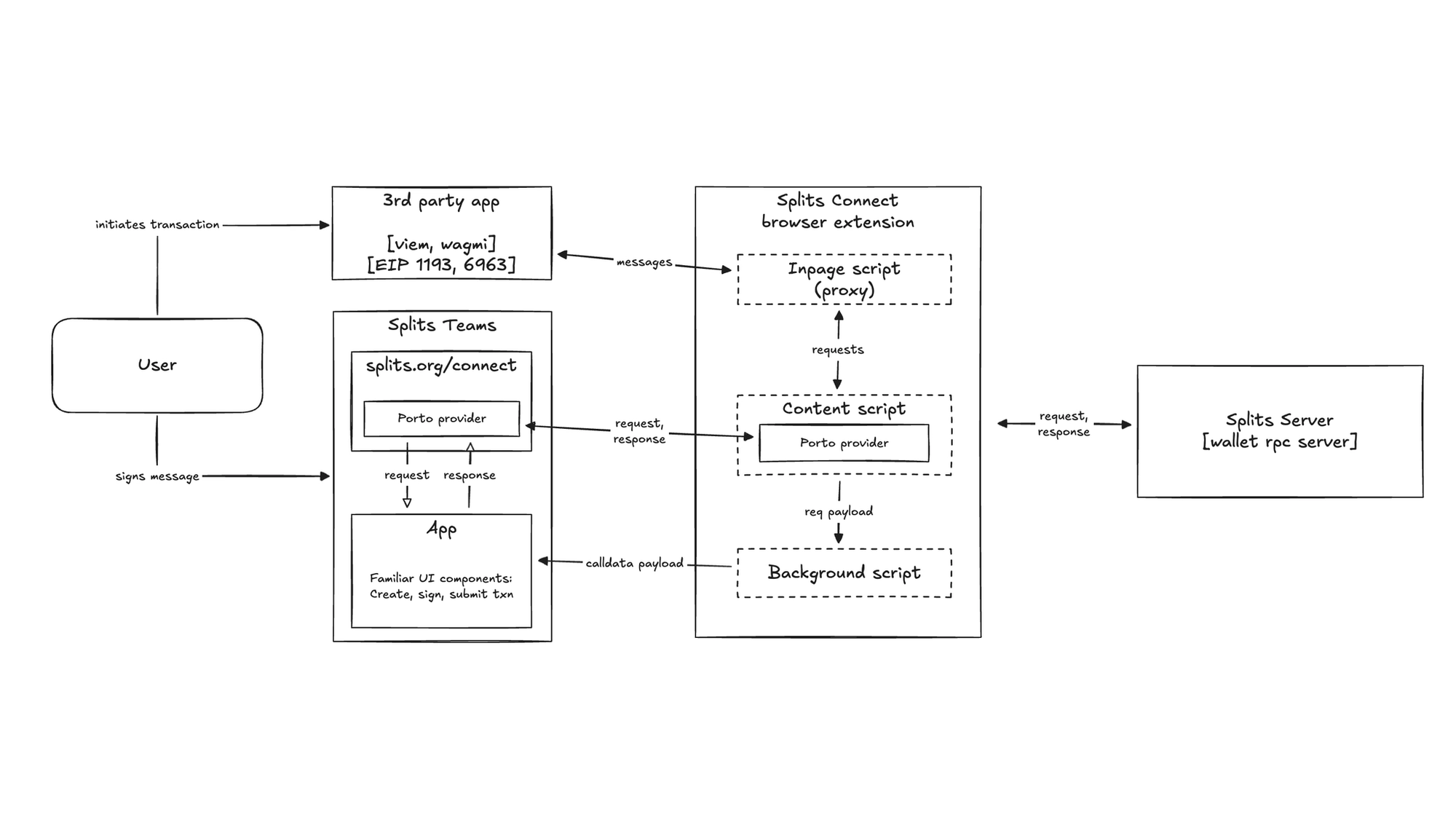
If you’d prefer to jump in to the code yourself, the splits-connect repo is public. At a high level, there are three parts that make it work: the browser extension itself, the existing Splits Teams app with a dedicated /connect route, and the Splits server. The extension is deliberately minimal — it’s a lightweight proxy that holds no keys and stores no data, and just bridges the gap between a third-party app and the Splits app.
We'll walk through each layer, explain why it exists, and point to the specific files that implement it.
What the customer sees
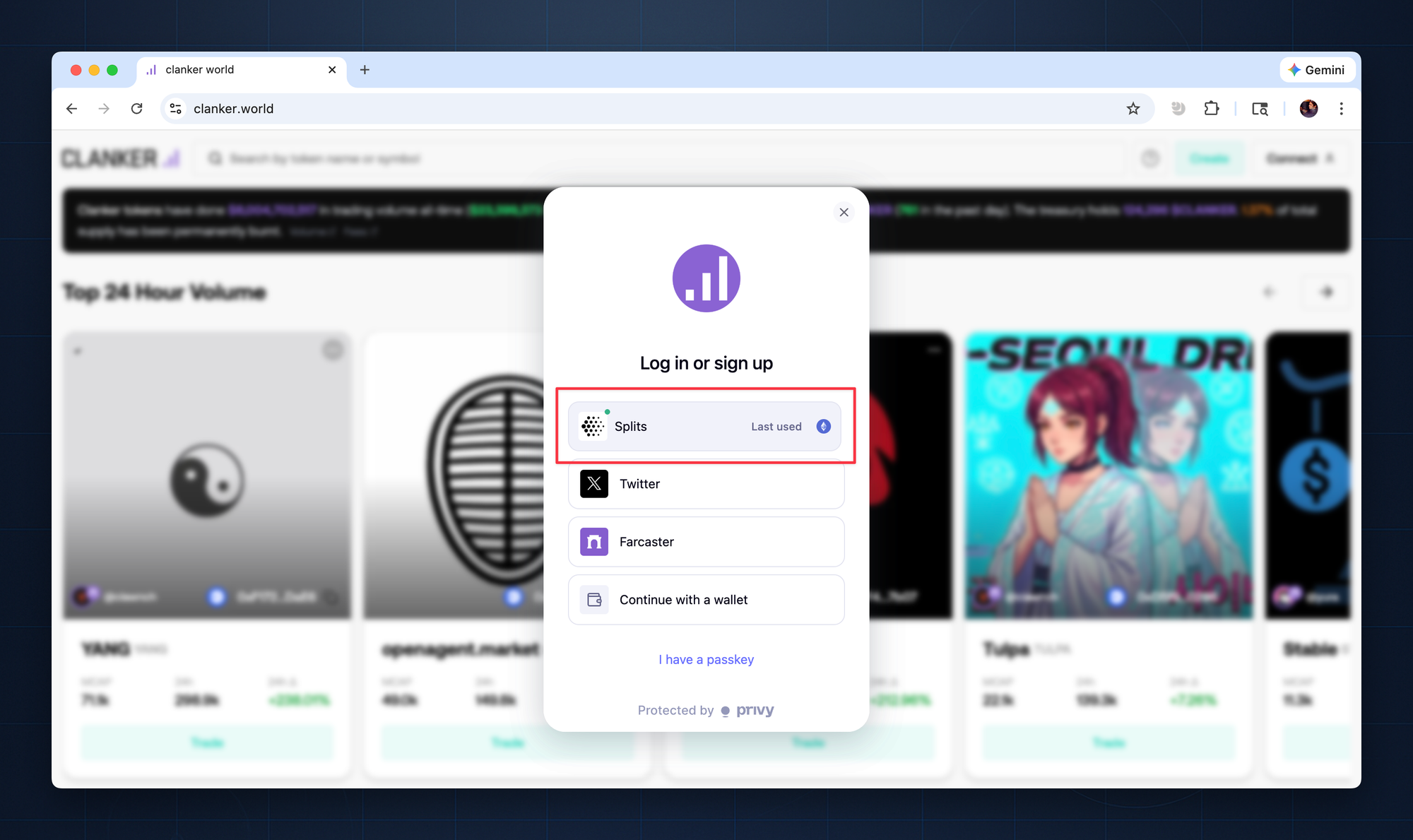
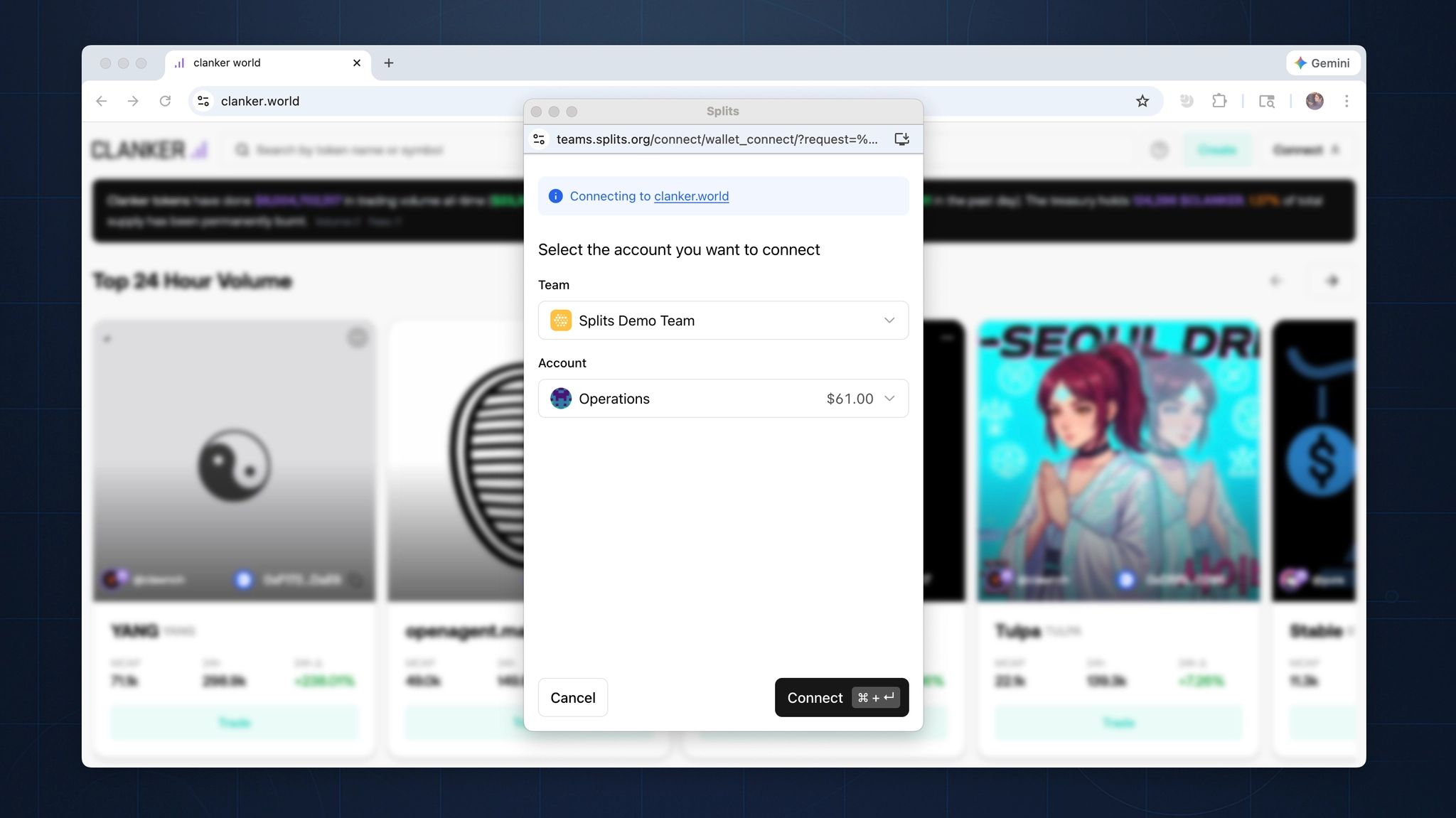
The customer experience is intentionally minimal: install the extension, visit an app, select Splits as the wallet to connect, and choose the team and account to use.
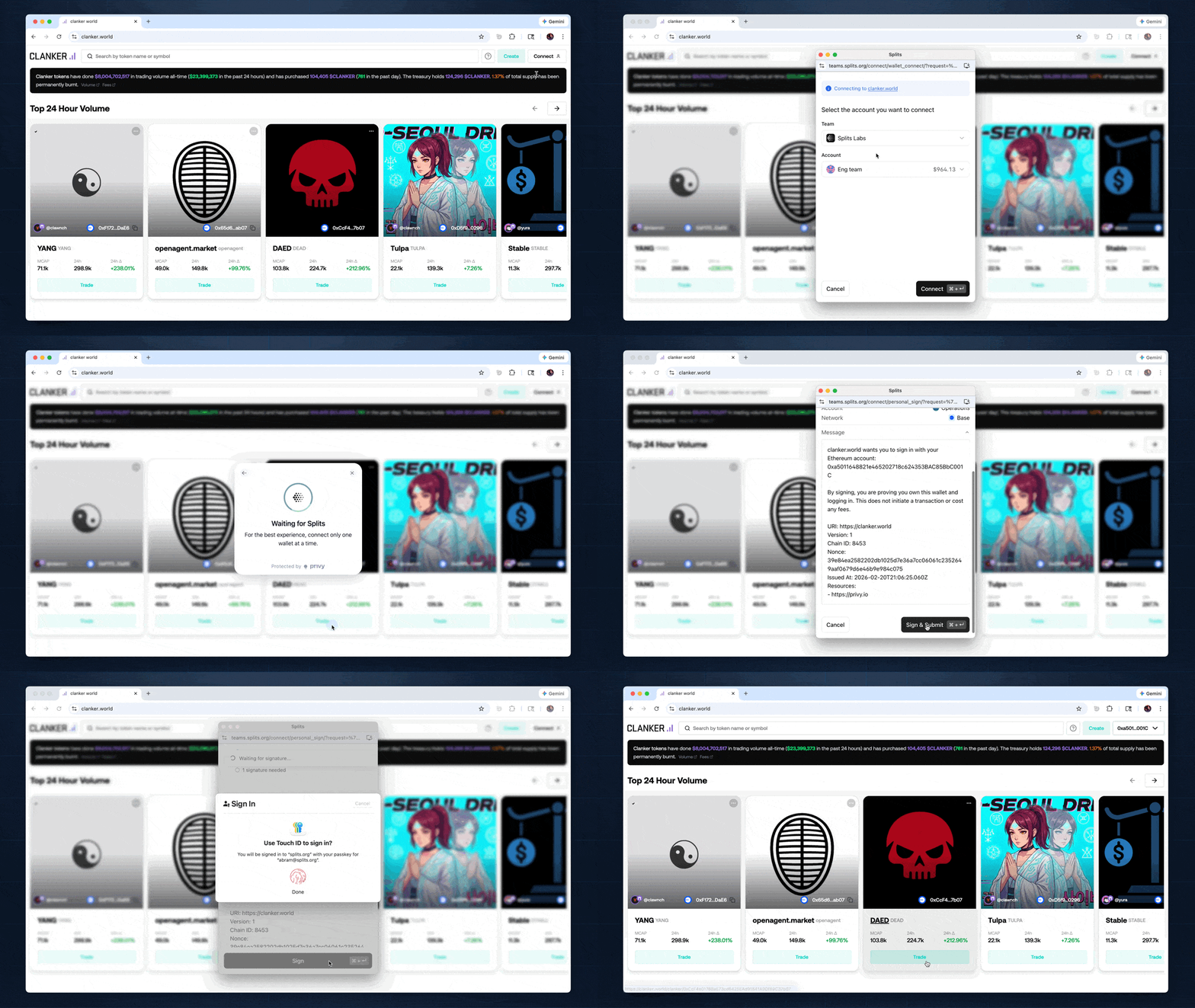
By using the same front-end components, we’re able to make the experience immediately familiar— the team picker, the transaction review screen, the memo field, the confirmation flow, passkey signing. It’s the same interface, whether operating inside the primary app or through a third-party site.
And not only are the interfaces consistent across Splits surfaces, the interface is consistent with non-blockchain products as well, like OAuth and the “Sign in with Google” flow that has been hardened over decades.
There is no context switching and no unfamiliar interface. The extension surfaces what our customers already know how to use.
How it works
How an app discovers Splits Connect
Discovery starts before the customer does anything. The extension's inpage script injects into the MAIN world of every HTTPS page at document_start — before the page's own JavaScript executes. This is a standard pattern for wallet extensions, and it ensures Splits is available by the time the app initializes.
The script creates a SplitsEthereumProvider instance and announces it using EIP-6963. It dispatches an eip6963:announceProvider event carrying provider info: the Splits logo, the name "Splits," a reverse-DNS identifier (org.splits.teams.connect), and a deterministic UUID. It also listens for eip6963:requestProvider events and re-announces, so apps that initialize late still discover it.
Any app built on viem or wagmi picks up Splits automatically. The wallet just appears in the list, without any special integration or configuration.
What happens when the app sends a request
The SplitsEthereumProvider implements the full EIP-1193 interface, but it is purely a proxy. It holds no wallet, manages no keys, signs nothing. Every call to request() gets a unique ID, then travels via window.postMessage to the content script running in the same tab.
All messages follow a namespaced protocol defined in bridge.ts. Source identifiers distinguish the two ends: splits-connect:porto:inpage and splits-connect:porto:content. Message types — request, response, event, ready, ready-request — are explicit. Type guards verify both the source and type fields before any message is processed.
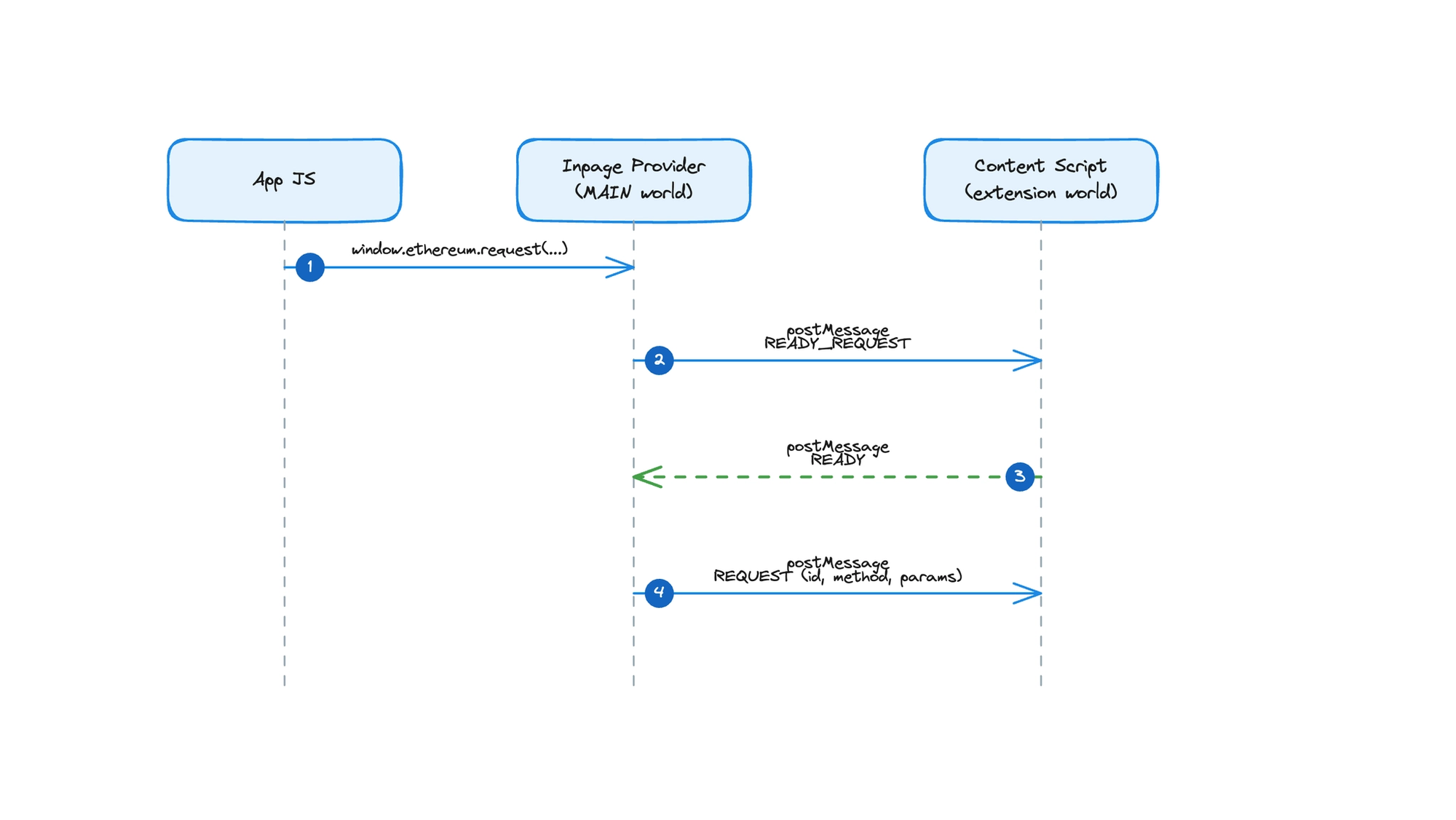
The two scripts coordinate through a readiness handshake. The inpage script sends a ready-request message every 250 milliseconds until the content script responds with ready. If request() is called before the bridge is established, messages queue in an outbound buffer and flush automatically once the handshake completes. The app never knows there was a delay.
Responses follow the same path in reverse. The content script posts a response via postMessage, the provider matches it to the pending promise by ID, and resolves or rejects accordingly. Events like accountsChanged and chainChanged also flow back through postMessage, and the provider emits them to the app as standard EIP-1193 events.
The entire round trip happens through postMessage within the same tab without network hops, relay servers, or WebSocket connections.
Why we separated the inpage script and content script
The original architecture was simpler: one script, running in the MAIN world, with the Porto provider embedded directly. It handled discovery, message processing, and network requests all in one place. Early testing worked fine. Then we tested with Uniswap.
Uniswap enforces a strict Content Security Policy with an explicit allowlist of domains permitted to make network requests. The Splits server was not on that list. Porto needs to reach the Splits server for critical calls — wallet_getCapabilities, for instance, tells the app whether Splits supports paymaster sponsorship, whether it's a smart wallet, and which chains it operates on. With CSP blocking those requests, the wallet appeared broken. It could announce itself but couldn't answer the app’s first real question.
The fix was architectural. The inpage script stays in the MAIN world because it must — EIP-6963 announcement and postMessage communication with the app require access to the page's window object. But it does nothing else. It became a pure message forwarder. The Porto provider moved into the content script, which runs in the extension's ISOLATED world. That world has its own execution context, its own network stack, and critically, its own CSP — which is the extension's, not the page's.
Third-party apps keep their security policies intact. Splits makes its network requests without needing permission from every app it connects to. Asking each app to add the Splits server to their CSP allowlist would have meant gating our distribution on other teams' deployment cycles.
The Uniswap engineering team helped us identify the right model here, and their strict CSP ultimately pushed us toward a cleaner architecture than we started with.
From content script to Splits Teams
The content script stays quiet until an app actually needs it. When the first RPC request arrives from the inpage bridge, the content script lazily initializes a Porto provider.
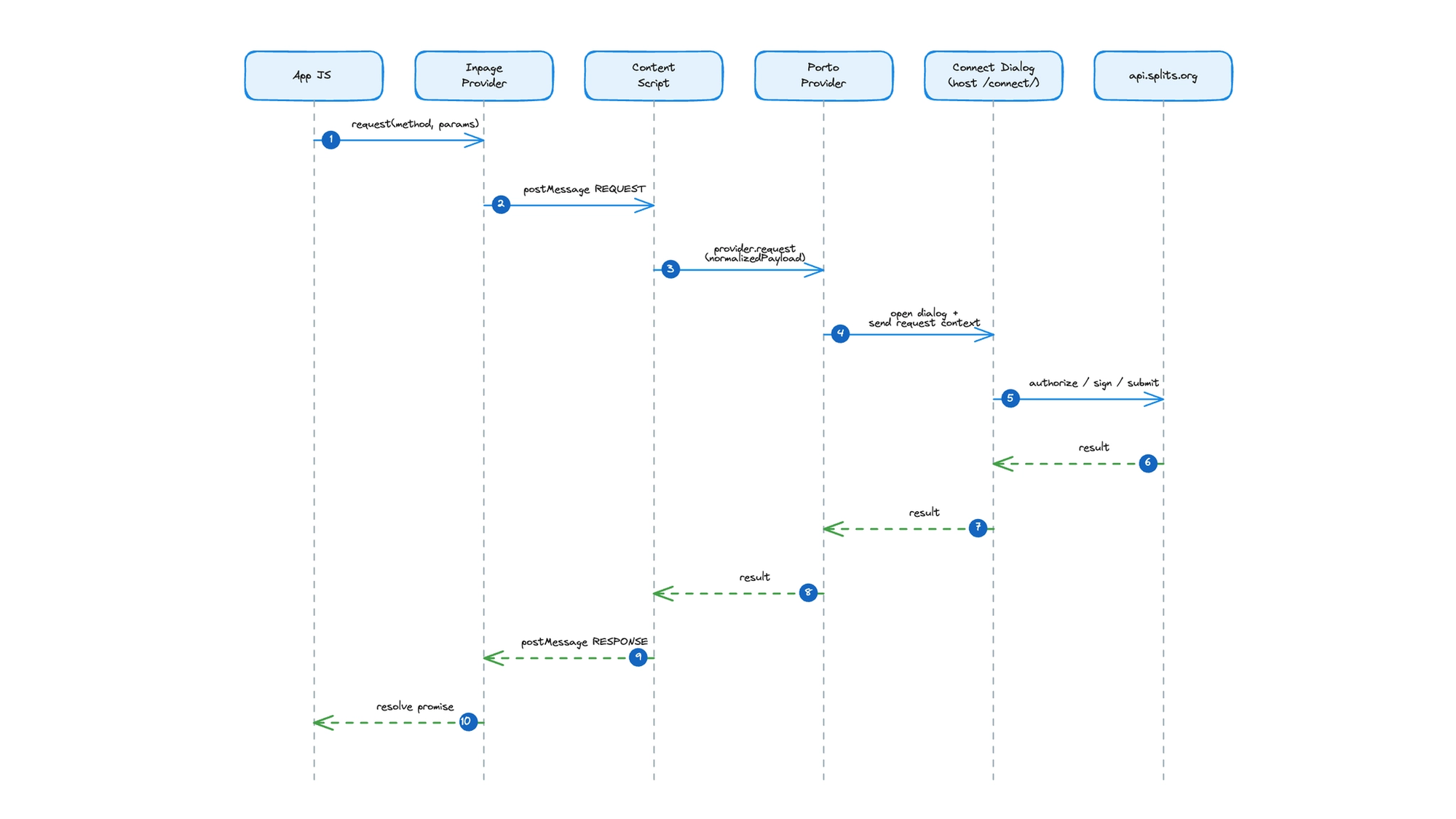
Porto is configured in dialog mode, pointed at teams.splits.org/connect/ as its host. The popup renderer opens a small window. A relay transport connects to the Splits relay server, giving Porto the communication channel it needs. The extension never touches private keys or constructs transactions.
On the other side of that dialog, the Splits Teams app runs its own Porto provider as a relayer. This relayer receives inbound requests from the content script and routes each type to a dedicated page. Connection requests land on /connect/wallet_connect. Transaction signing goes to /connect/eth_sendTransaction. Batch calls route to /connect/wallet_sendCalls. Dedicated pages per request type keep each handler self-contained; the signing page only knows about signing, the connection page only knows about connection. Each page renders using the same UI components as the primary Splits Teams application. A customer who signs a transaction from Uniswap sees the same interface they would inside Splits Teams itself.
This architecture also means the extension rarely needs updates. All wallet logic, transaction handling, and UI components live in the Splits Teams web app, deployed and versioned alongside everything else. A change to the approval flow ships as a normal web deployment, not an extension update waiting on a Chrome Web Store review.
The full round-trip traces a clean path: app calls the provider, the inpage script forwards across the bridge, the content script hands it to Porto, Porto opens the dialog popup, the Splits Teams relayer processes the request against the API, and the response travels back through every layer in reverse. When the user navigates away, Porto is destroyed.
Dialog over iframe
Porto supports both iframe and dialog rendering modes. With iframes, every app would need to allowlist the iframe's origin in its Content Security Policy — the exact same per-site coordination problem that made the inpage script story difficult. Porto itself recognizes this tension and falls back to dialog mode when an app’s CSP blocks its iframe. We chose dialog from the start to simplify.
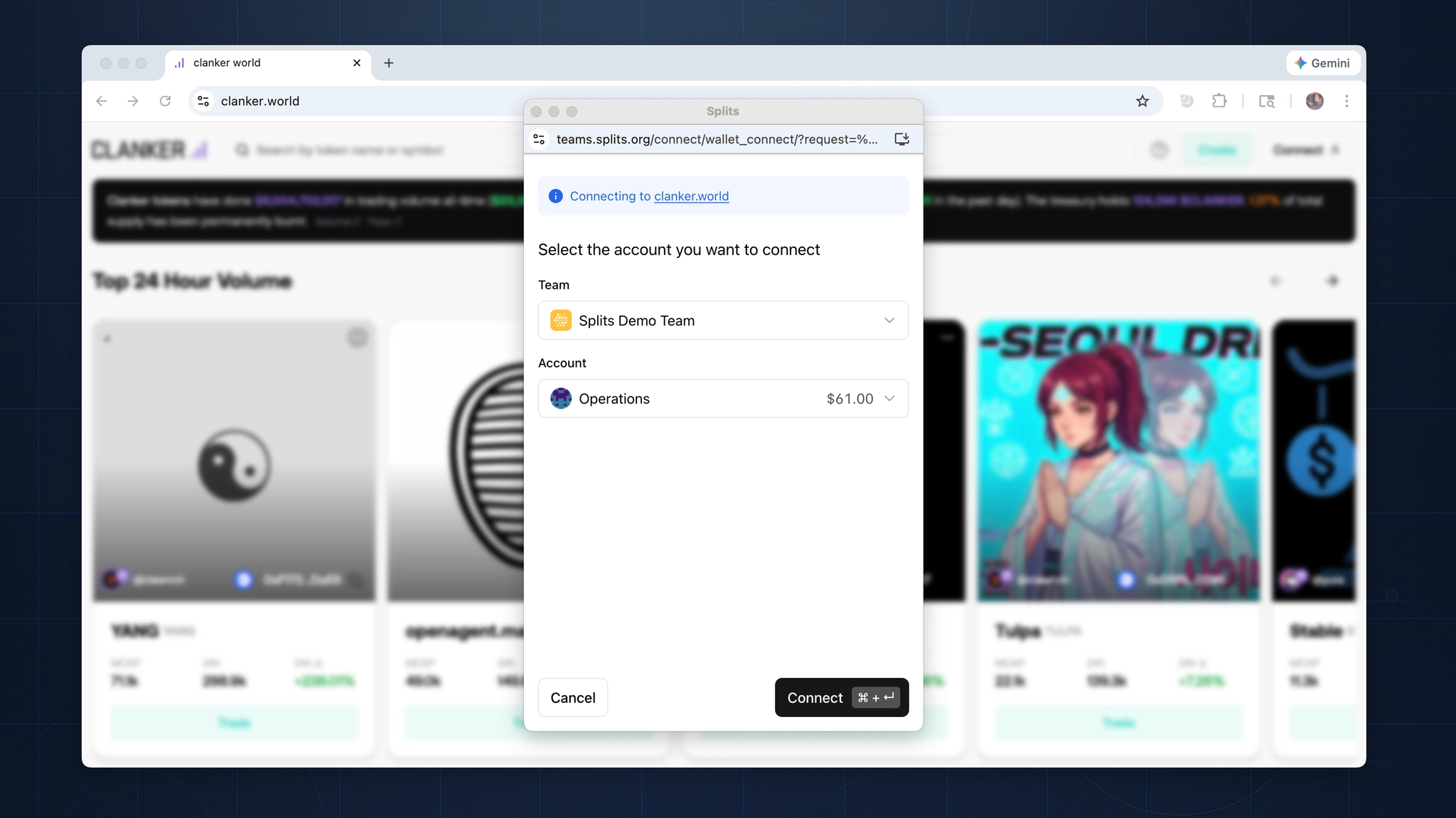
This choice also shaped the URL structure. The connect experience lives at teams.splits.org/connect rather than connect.splits.org. A path on the existing domain shares the app's authentication context and avoids introducing a new origin that would create its own CSP surface area.
The background script and large payloads
Routing each request type to its own page URL in the dialog creates a practical problem. Request data gets encoded into the URL, and URLs have length limits. Most RPC calls are small enough that this never matters. But complex contract interactions like multi-hop swaps, batch operations, large calldata payloads can grow beyond what browsers accept in a URI.
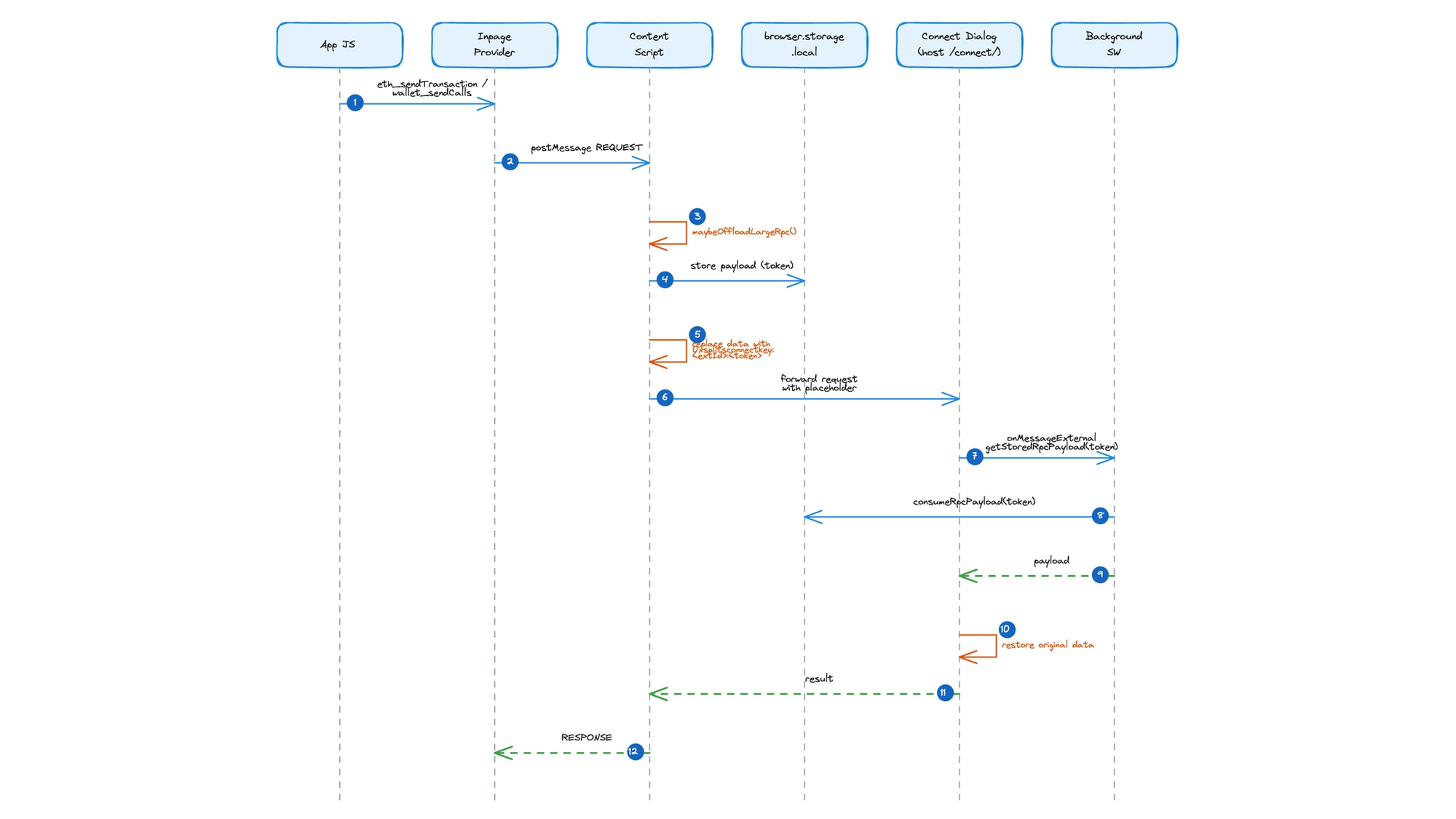
The rpc-offload utility solves this with a storage-and-token pattern. When the content script intercepts an eth_sendTransaction or wallet_sendCalls request, it writes the payload to browser.storage.local with a UUID token and a five-minute TTL. A cleanup pass removed expired entries from previous requests.
The original data field is replaced with a compact placeholder: 0xsplitsconnectkey:<extensionId>:<token>. This string is small enough to pass through URL encoding without issue. The request flows through Porto and into the dialog as usual.
When the dialog detects a placeholder, it extracts the extension ID and token, then calls chrome.runtime.sendMessage to reach the background script. The background script calls consumeRpcPayload from the rpc-storage module, which reads and deletes the entry in a single operation (every payload is one-time use). The background script only accepts these messages from the configured Splits domain, enforced through the externally_connectable key in the extension manifest. The restored payload slots back into the request, and the dialog proceeds as if the data had traveled inline all along.
What we shipped and what's next
The extension is three scripts and a few hundred lines of TypeScript. The inpage script announces the wallet. The content script bridges messages and manages Porto's lifecycle. The background script handles payload storage and retrieval. That is the entire surface area. The code is public.
It has already replaced nearly all WalletConnect transactions for our customers. The practical benefits of owning the full stack showed up immediately: faster connections with no relay latency, predictable UI that matches the primary application, easier debugging. And our customers are thrilled to have the same experience everywhere.
The extension holds no keys, stores no persistent state beyond ephemeral payload tokens, and rarely needs updates. All wallet logic, all UI, all business rules live in the Splits application, which is deployed, versioned, and maintained as part of the existing web app. The extension is just a minimal proxy for discovery and message passing.
A Safari port is the main outstanding work — WebKit's extension APIs are close enough to Chrome's that the architecture translates, but the tooling and review process are their own project.
Browser extensions are underused as integration surfaces. The wallet ecosystem treats them as full applications — bundle the UI, bundle the key management, bundle the network stack. But if your application already exists on the web, the extension only needs to get the app’s attention and hand off the conversation. The less it does, the less there is to break.