Add agents to your multisig

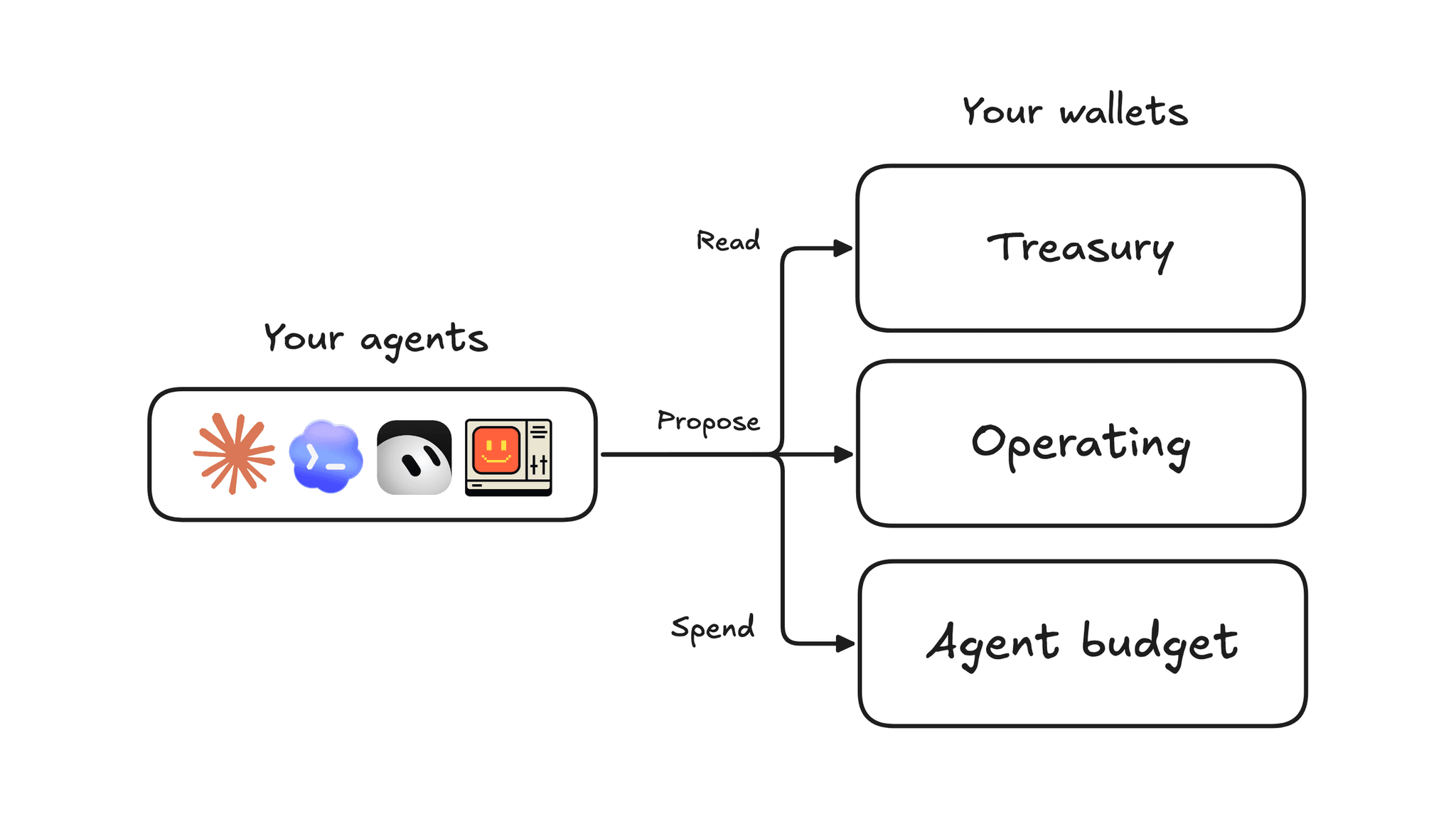
Your agent can now join your Splits Treasury as a team member with its own key, work across as many workspaces as you want from one CLI, and propose a top-up when its budget runs low.
Here is what's new:
- One CLI, many workspaces. Log in once per workspace and run any command in any of them.
- Add an agent to your primary workspace. It joins as a member with its own key and signing identity.
- Give your agent a budget. It pays on its own from a subaccount you fund, and the balance caps what it can spend.
- Give your agent a workspace of its own. You approve it in the browser; your email keeps root access.
- Agents request funds. They propose a transfer with a memo and you approve it.
Hand this to your agent to get started today.
One CLI, many workspaces
Log your agent in once per workspace and the CLI saves each one.
splits auth workspaceslists themsplits auth use <alias>switches the active one--workspace <alias>runs a single command in another.- An agent connected over MCP gets the same through an optional
workspaceargument on each tool.
Add your agent to your primary workspace
You need the Splits CLI and an agent that can run shell commands, such as Claude Code.
- Install the CLI.
npm install -g @splits/splits-cli@latest - Log the agent in. The agent runs
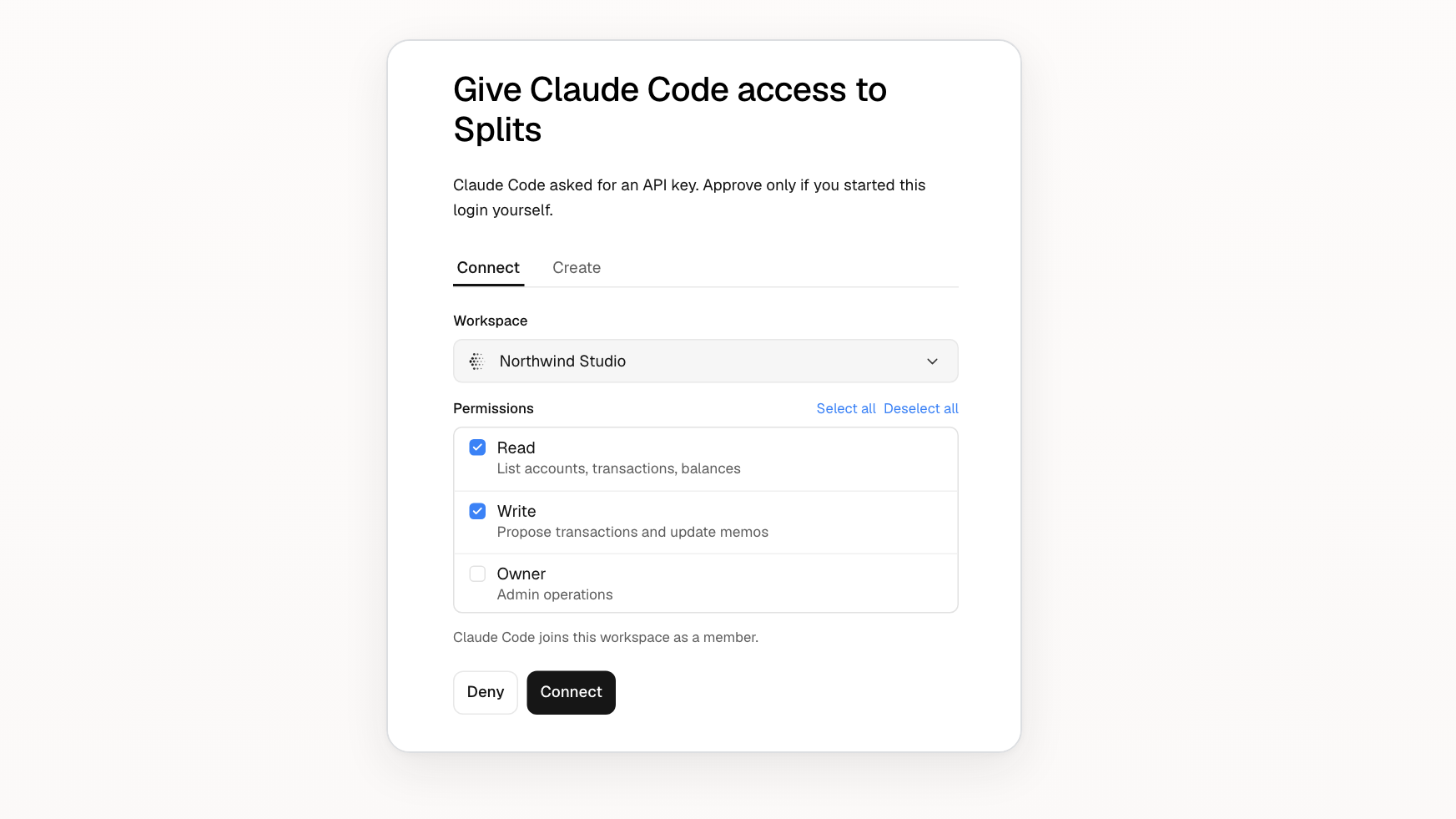
splits auth login --client-name "Claude Code". It prints a code. You open the page, enter the code, choose the workspace and appropriate permissions.
The agent is now a member. It can see your accounts and propose transactions. Being a member doesn't let the agent move funds.
Give your agent a budget
To let the agent spend, give it a subaccount and fund it. You and the agent are both signers on the subaccount, with a threshold of 1, so either of you can pay from it alone.
- Create the subaccount. In the app, create a subaccount named "Agent budget" with you as its signer. The app's create-account form can't add an agent's key, which is why the next step comes from the agent.
- Add the agent's key. The agent makes its own key with
splits auth create-key --register. Runsplits auth signersto see its ID. The agent then proposes adding it:splits accounts update-signers <account> --add-eoa-signer-ids <id>. You approve the change in the app. - Fund it from your Treasury.
- Let it work. The agent proposes and signs payments from its subaccount:
splits transactions create transfer --account <subaccount> --chain-id <chain> --recipient <address> --token <token> --amount <amount> --memo "<what it's for>", thensplits transactions sign <id>.
A payment onchain can't be reversed, so fund its subaccount with only what you can afford to lose.
Give your agent a workspace of its own
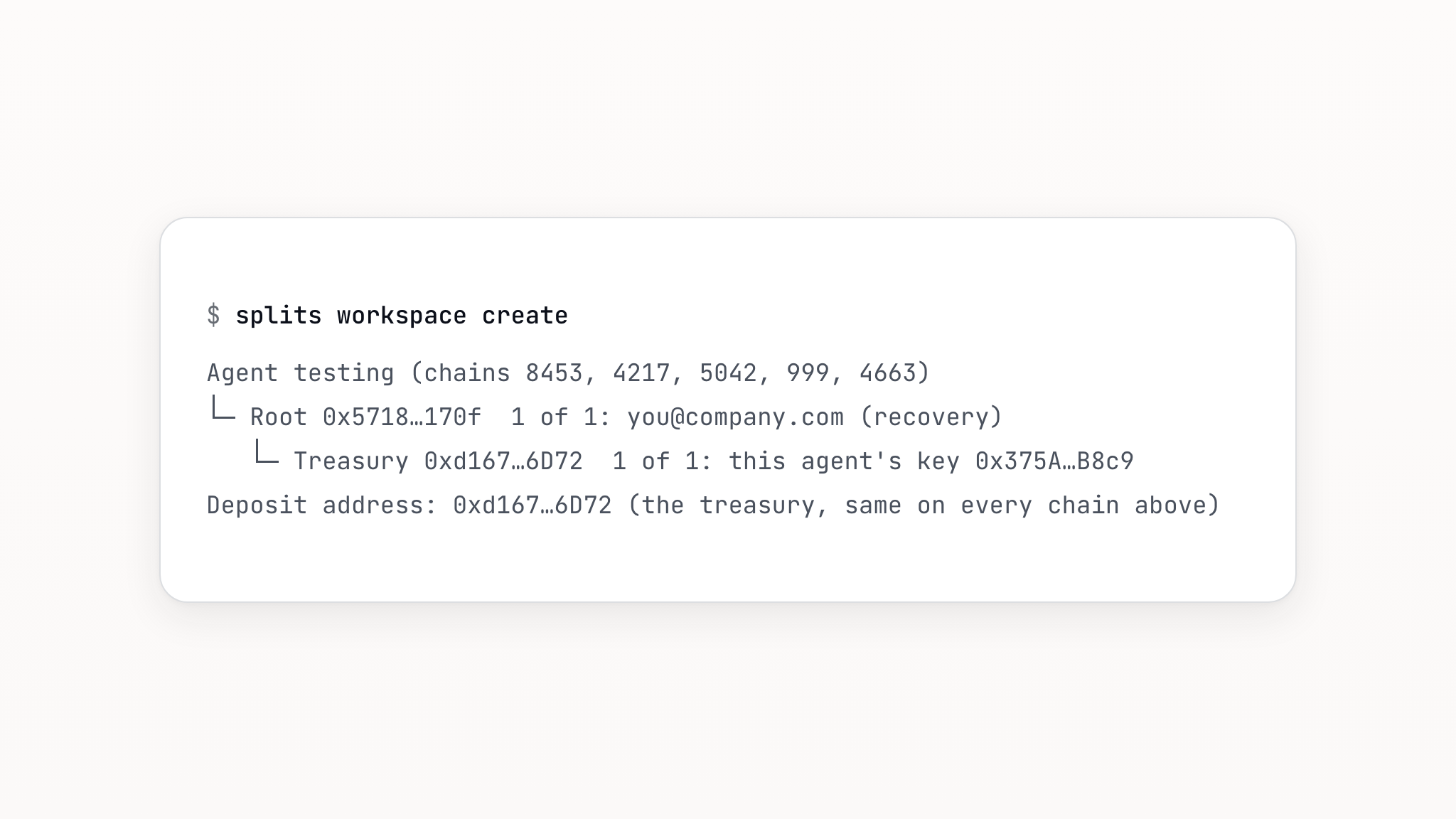
When you want the agent fully separate from your workspace, have the agent create one: splits workspace create --name "<name>" --client-name "Claude Code".
You approve it in the browser. Your email keeps root access to all agent workspaces.
Let your agent request funds
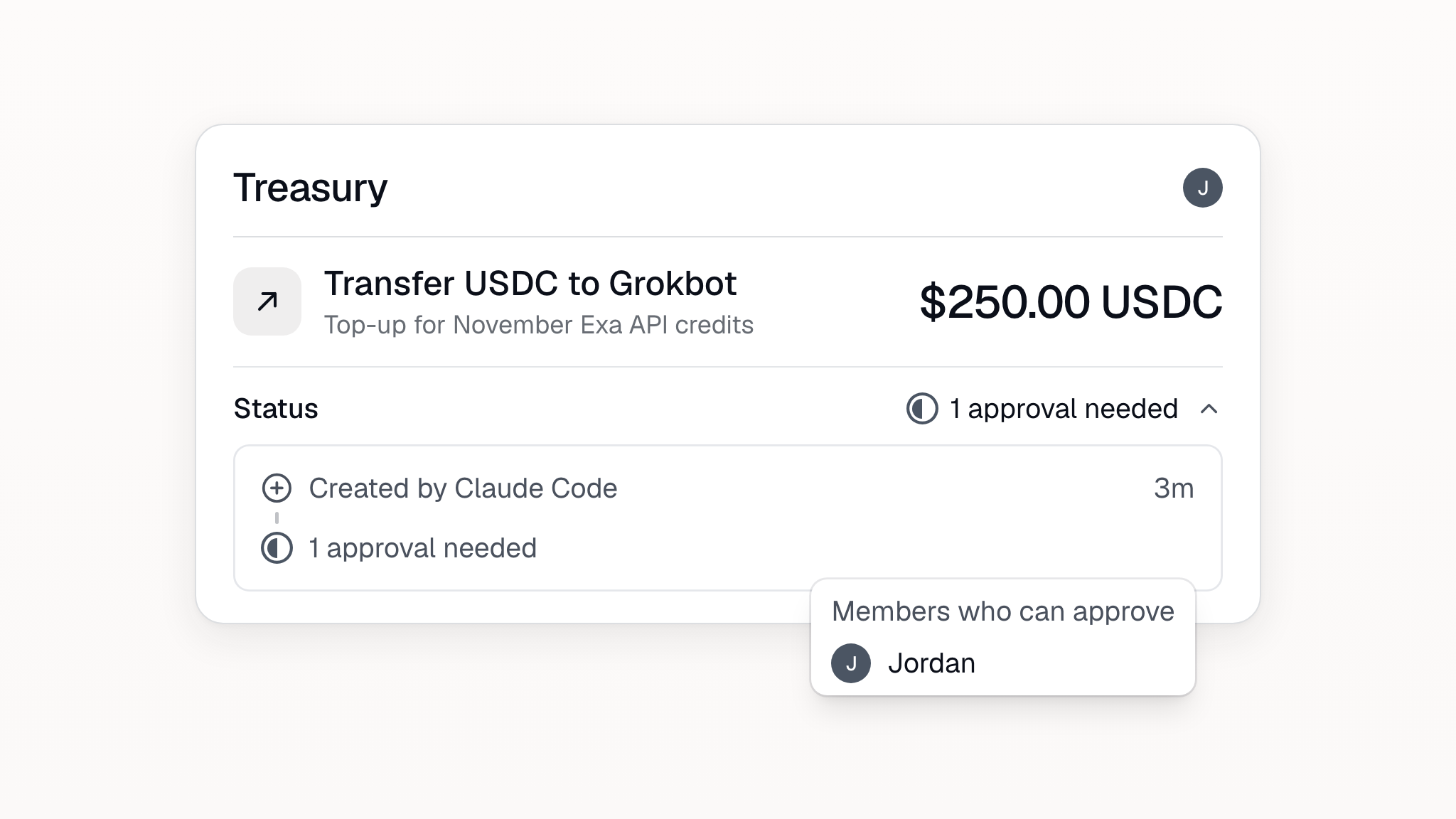
A transfer proposal is a request. When the budget runs low, an agent with a Write key proposes a transfer from your Treasury to its own subaccount, with a memo saying what it's for.
An agent with its own workspace asks the same way: with a Write key for both, it runs the proposal with --workspace <main-alias> and its own Treasury as the recipient.
You see the amount and the memo, and approve it with your passkey.
How it fits together
Two things decide what an agent can do. Where it has a Write key decides where it can ask. Where its own key is a signer decides where it can spend.
| If you want the agent to… | Set it up like this | The most it can spend |
|---|---|---|
| Read and suggest | Add it as a member | Nothing. |
| Spend a fixed amount on its own | Give it a subaccount and fund it | The full subaccount balance. |
| Require your approval to spend | Add it as a co-signer (2-of-2) | Only approved payments. |
| Stay fully separate from your main workspace | Give it a workspace of its own | The full workspace balance. |
Require human approval
Use the same subaccount and require two signatures. As an owner, run splits accounts update-signers <account> --threshold 2 or change the signer threshold in the app. Now the agent can propose and sign a payment, but nothing leaves until you approve it with your passkey.
Rotate an agent's key
Rotating swaps the agent's key on a subaccount without changing the subaccount's address or balance. Your Treasury owns every subaccount, so your Treasury's signers can reset its signers without the agent.
- Remove the old key. Run
splits accounts update-signers <subaccount> --remove-eoa-ids <id>(get the ID fromsplits accounts signers <subaccount>) and approve with your passkey. On a 1-of-2, your signature alone is enough. - Make a new key. The agent runs
splits auth create-key --register, thensplits auth delete-keyto remove the old key locally. - Add the new key. The agent proposes it with
--add-eoa-signer-idsand you approve. - Fallback note: If the subaccount is 2-of-2, or the agent's key is lost or unresponsive, reset account signers instead.
Remove an agent's read and propose access
Remove the agent in Settings > Members. That ends its read and propose access to the workspace.
Important to note: Removing the agent from your workspace does not remove it as a signer. Follow the steps above to remove access to any subaccounts it might have.
FAQ
What is an AI agent wallet? An account an AI agent can sign for with its own key. On Splits it's a subaccount that lists the agent's key as a signer.
With a threshold of 1 the agent can spend the balance on its own. With a threshold of 2, every payment needs a co-signer (this could be a human, a policy server, or another agent).
Can AI agents spend money? Yes, if you make them a signer on an account that holds funds. On Splits you decide how much: the balance of its subaccount is the most the agent can spend, and in a co-signed account it can only propose payments.
How do I limit how much an AI agent can spend? Fund its subaccount with only what you're willing to let it spend.
Should I give my AI agent my private key? No. With Splits the agent makes its own key and proposes it for a subaccount, and you approve it. Your private keys and signers stay with you.
Does this work with x402 and MPP? Yes, in subaccounts where your agent can sign on its own (a threshold of 1). With x402, the agent signs the payment from the account and a facilitator settles it in USDC on Base. With MPP, the agent sends an ordinary transfer on Tempo and presents the transaction hash, which servers that support that mode accept. We've paid live x402 and MPP endpoints this way from a Splits account. The x402 signature comes from the CLI's splits accounts sign-message command, so you'll connect your x402 client to the CLI with a small adapter.
Further reading
- Get started: AI agent wallet with human approval
- Solutions: Using AI agents on Splits
- Related post: Custom financial harnesses for agents